WarehouseControlSystem

|
■Introduction The warehouse management system is a barcode reader equipped with a simple database suitable for warehouse management. Please use it for inventory management. Since it can be exported as a CSV file on an SD card, full-scale systemization using Excel etc. is also possible. ①This is the first screen of the application.

|
|
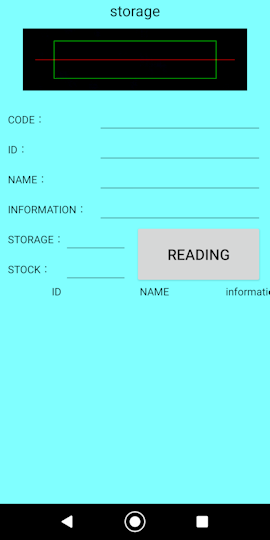
■Storage ②Storage Grab the barcode so that it fits in the green frame of the scanner and tap the read button. You can switch the light on and off by pressing and holding the read button. If not registered, the "New Item" dialog will appear. Please enter the number of arrivals and tap the registration button.
|
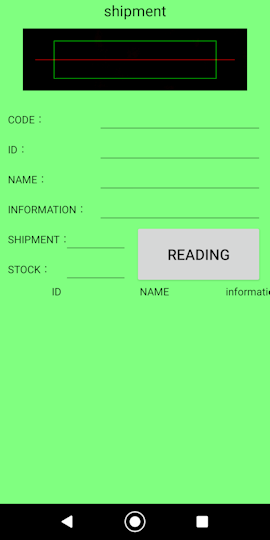
■Shipment ③Shipment Grab the barcode so that it fits in the green frame of the scanner and tap the read button. You can switch the light on and off by pressing and holding the read button. If not registered, the "New Item" dialog will appear. Please enter the number of shipments and tap the registration button.
|
■Goods receipt management ④Goods receipt management You can get information on the number of arrivals. You can use search to get individual information such as by item, by manufacturer, and by month. Red characters are the targets of search and deletion. To change the target, tap on the text.
If you check the check box, you can search for "contains characters". 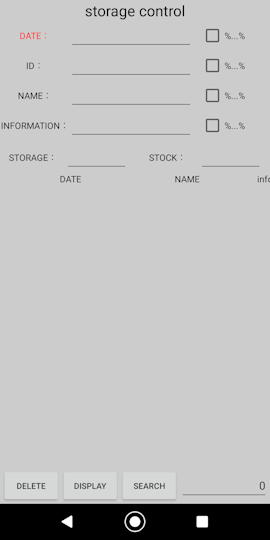
|
■Goods issue management ⑤Goods issue management You can get information on the number of shipments. You can use search to get individual information such as by item, by manufacturer, and by month. Red characters are the targets of search and deletion. To change the target, tap on the text.
If you check the check box, you can search for "contains characters". 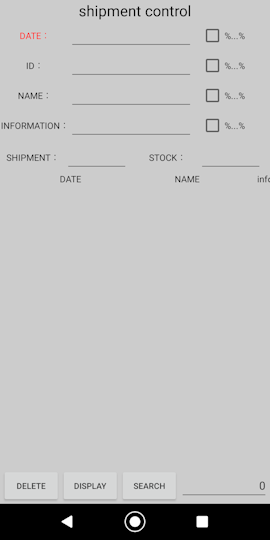
|
■Inventory control ⑥Inventory control Maintenance such as inventory management and deletion of unnecessary items can be performed. Red characters are the targets of search and deletion. To change the target, tap on the text.
If you check the check box, you can search for "contains characters". 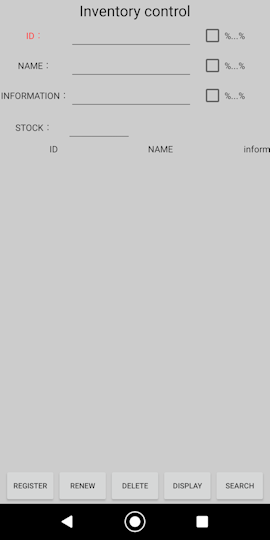
|
■export ⑦export You can export as a CSV file on the SD card. Mark in stock and export all in-stock items
Mark receipt and export 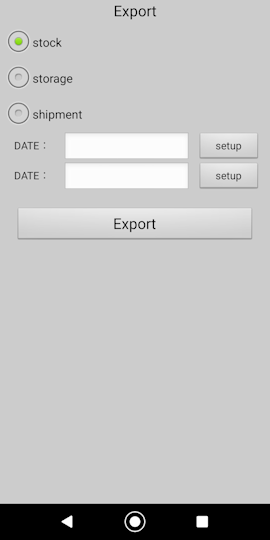
|
■in conclusion We hope this app helps you manage your inventory. |